

- Exam Code: NCM-MCI-6.10
- Exam Name: Nutanix Certified Master - Multicloud Infrastructure (NCM-MCI)
- Updated: Nov 26, 2026
- Q & A: 33 Questions and Answers
Generally, when you buy some goods, and if you find some flaw, the vendor often admit to replace the goods with you, even though the vendor reply to refund, the process is cumbersome and the money back to you is too slow. But Exam4Tests is different. If you don't pass the exam, you just need to send us your failure transcript of NCM-MCI-6.10 exam test, then Exam4Tests will give you a full refund, thus the money you spent on NCM-MCI-6.10 test won't be wasted. Actually the passing rate of Master Level NCM-MCI-6.10 exam dumps is very high. We have already heard some good news from the customers who used the NCM-MCI-6.10 Nutanix Certified Master - Multicloud Infrastructure (NCM-MCI) exam dumps. So you can buy the NCM-MCI-6.10 test dumps without any burden and worries. When you have bought NCM-MCI-6.10 test dumps, you will enjoy the preferential treatment of one year free update, which means you will keep your information about NCM-MCI-6.10 exam test all the latest.
Instant Download: Upon successful payment, Our systems will automatically send the product you have purchased to your mailbox by email. (If not received within 12 hours, please contact us. Note: don't forget to check your spam.)
When you face the NCM-MCI-6.10 exam, you must be no-mind and don't know what to do next. It is time to wake up and carry out actual plan. Nutanix NCM-MCI-6.10 training test will give you bright thoughts. When you attend NCM-MCI-6.10 exam test, you should have a good knowledge of Master Level & NCM-MCI-6.10 first, so you can visit Nutanix Master Level and find the related information. Then, the most important thing is to go over the NCM-MCI-6.10 study materials.
When you scan Nutanix NCM-MCI-6.10, you can pay attention to the exam code and name to ensure that is the right one you are looking for. Besides, you will find there are three different free NCM-MCI-6.10 Nutanix Certified Master - Multicloud Infrastructure (NCM-MCI) exam demos for you to download. You can do the demo test first to inspect the value of Master Level NCM-MCI-6.10 test dumps. When you buy the NCM-MCI-6.10 exam dumps, you can download it as soon as possible after payment, then you can do test and study. There are three files for you, if you want to do marks on papers, the NCM-MCI-6.10 PDF file are the best for you. NCM-MCI-6.10 PDF file can be printed to papers and it is convenient to mark the key points. If you want to test your ability and scores during the practice, the NCM-MCI-6.10 SOFT and APP file are suitable for you. So you can control your test time and adapt the NCM-MCI-6.10 actual test more confident.
With the aid of NCM-MCI-6.10 exam dumps, your preparation will be well enough for the NCM-MCI-6.10 certification. There is no problem to pass the NCM-MCI-6.10 exam test.
Everyone has dream, although it is difficult to come true, we should insist on it and struggle to the last. So, if you are busy with NCM-MCI-6.10 exam test and feel difficult, please insist on and do not give up. There are ways helping you to get out.
Master Level NCM-MCI-6.10 exam dumps can provide some help for you. NCM-MCI-6.10 Nutanix Certified Master - Multicloud Infrastructure (NCM-MCI) exam questions & answers are codified by Nutanix qualified experts. The NCM-MCI-6.10 exam dumps simulated to the actual test and give you a high hit shot. With the high-quality and high accuracy of Nutanix Certified Master - Multicloud Infrastructure (NCM-MCI) exam training, you can pass the NCM-MCI-6.10 exam test with ease.

| Section | Weight | Objectives |
|---|---|---|
| Business Continuity and Disaster Recovery | 15% | - Disaster recovery strategy implementation - BCDR testing and validation - Replication and recovery configuration - Failover and failback operations |
| Monitoring, Automation and Operational Efficiency | 5% | - Operational process optimization - Monitoring and alerting configuration - Automation workflows and tools |
| Analyze and Optimize Storage Performance | 20% | - Troubleshoot storage performance bottlenecks - Understand storage internals and I/O patterns - Evaluate and resolve competing workload requirements - Optimize storage configuration and settings |
| Virtualization and VM Performance Optimization | 15% | - Performance metrics analysis and tuning - AHV administration and workload management - VM resource adjustment and optimization - High availability and migration management |
| Advanced Platform Configuration and Troubleshooting | 25% | - Security configuration and compliance - Cluster management, expansion and maintenance - API and CLI-based operations - Integration with third-party systems - Prism Central and Prism Element configuration |
| Network Performance and Security | 20% | - Tune overlay networking and traffic flow - Network troubleshooting and optimization - Optimize physical and virtual network configurations - Implement and analyze Flow security policies |
An administrator needs to configure a new write-intensive MS-SQL VM on Cluster 1.
VM specifications:
* vCPU: 12
* vRAM: 128GB
* Storage: 100 GB OS, 750 GB Data
Create the VM and any objects needed in the current environment to meet requirements, maximizing performance for the production environment. Include NEWSQL in the name of any new objects.
Production environment:
* 4 nodes
* Each node has two 8-core CPUs
* Each node has 1024 GB RAM
* Storage: 4 × 7.16 TB SSD Disks and 8 × 8 TB HDD disks
Make sure the VM is configured for maximum performance for the production environment.
Note: Network configuration is not required at this time. Do not power on the VM.
Correct Answer:
See the Explanation below for detailed answer.
Explanation:
Here is the step-by-step solution to create the high-performance SQL VM on Cluster 1.
This task requires two phases: first, creating a new all-flash storage container, and second, creating the VM with a specific vNUMA and disk controller configuration for maximum performance.
1. Access Cluster 1 Prism Element
* From the main Prism Central dashboard, navigate to Hardware > Clusters.
* Find Cluster 1 in the list and click its name. This will open the specific Prism Element login page for that cluster.
* Log in to Cluster 1's Prism Element interface.
2. Create the All-Flash Storage Container
To maximize performance for a "write-intensive" workload on a hybrid cluster, the data and log disks must be placed on an all-flash container.
* In the Cluster 1 PE interface, click the gear icon (Settings) in the top-right corner.
* From the left-hand menu, select Storage.
* Click the + Storage Container button.
* Fill in the basic details:
* Name: NEWSQL_Flash_Container
* Click Advanced Settings.
* Scroll down to the Storage Tier section.
* Select the SSD radio button. This pins all data in this container to the SSD tier, ensuring all-flash performance.
* Click Save.
3. Create and Configure the VM
Now, create the VM, applying vNUMA and multi-SCSI controller best practices.
* From the main PE dashboard, navigate to the VM view.
* Click the + Create VM button.
* Enter the compute details. This configuration is critical for vNUMA performance, as it tells the VM's guest OS about the underlying physical NUMA topology (2 CPUs with 8 cores each).
* Name: NEWSQL_VM
* vCPUs: 12
* Number of Sockets: 2
* Cores per vCPU: 6 (This creates a 2-socket, 6-core VM, totaling 12 vCPUs)
* Memory: 128 GB
* Scroll down to the Disks section and add the OS disk:
* Click + Add New Disk.
* Storage Container: Select the default (hybrid) container.
* Size: 100 GB
* Bus: SCSI
* Device Index: 0 (This will be scsi.0)
* Click Add.
* Add the Data disk (on its own controller for parallel processing):
* Click + Add New Disk.
* Storage Container: Select NEWSQL_Flash_Container.
* Size: 750 GB
* Bus: SCSI
* Device Index: 1 (This creates a new controller, scsi.1)
* Click Add.
* Add a Log disk (on its own controller, a best practice for "write-intensive" SQL):
* Click + Add New Disk.
* Storage Container: Select NEWSQL_Flash_Container.
* Size: 100 GB (A common size for a log disk)
* Bus: SCSI
* Device Index: 2 (This creates a third controller, scsi.2)
* Click Add.
* Review the configuration: You should now have three disks attached, each on a separate controller (scsi.
0, scsi.1, scsi.2). This provides the maximum I/O performance.
* Ensure the Power on VM after creation box is unchecked.
* Click Save.
Topic 1, Performance Based Questions Set 1
Environment
You have been provisioned a dedicated environment for your assessment which includes the following:
Initial Steps
* When you first log into Prism Central or Prism Element you may see the EULA screen. Accept the EULA with any name and then disable Pulse.
* To access Prism Element, the pass-through from Prism Central
(Infrastructure\Hardware\Clusters\cluster-x\Launch Prism Element) works better than directly using the external IP:9440.
Workstation
* Windows Server 2019
* All software/tools/etc to perform the required tasks
* Nutanix Documentation and whitepapers can be found in Desktop\Files\Documentation and Desktop\Files\Documentation 6.10
* Note that the Workstation is the system you are currently logged into
* Windows Server 2019
* All software/tools/etc to perform the required tasks
* Nutanix Documentation and whitepapers can be found in Desktop\Files\Documentation and Desktop\Files\Documentation 6.10
* Note that the Workstation is the system you are currently logged into Nutanix Cluster
* There are two clusters provided, connected to one Prism Central. The connection information for the relevant cluster will be displayed to the right of the question. Please make sure you are working on the correct cluster for each item. Please ignore any licensing violations.
Important Notes
* If the text is too small and hard to read, or you cannot see all of the GUI, you can increase/decrease the zoom of the browser with CTRL + and CTRL - (the plus and minus keys).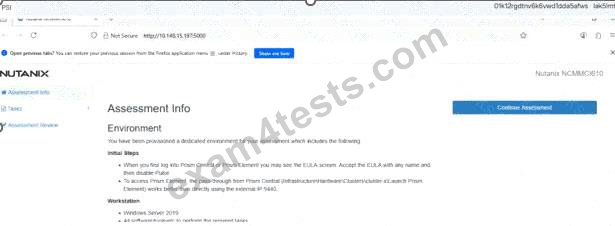
Prism Central Web Console
* admin / ykZUCJMER7V*
* nutanix / UJ2xE!DEXGY
Cluster 1
* CVM external IP: 34.53.118.63
* CVM DR IP: 172.30.0.6
* admin / 9Fw0B!3QH4X)
* nutanix / GNP*FE2504XWZ
* root / KR*6HY0z5E8
Cluster 2
* CVM external IP: 34.82.155.5
* CVM DR IP: 172.30.0.4
* admin / 5*K30fA76X
* nutanix / N*3F%1ME!Z7T9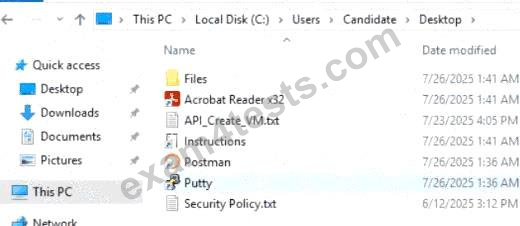
Following new security guidelines, it must be ensured that the storage of critical virtual machines will be encrypted in future.
The assignment is to be made by a new category called VM-Storage with a value of softwareencrypted in Prism Central. Make sure a second value of SEDencrypted is also created for future use.
Create the above-mentioned category and perform further configurations in Prism Central for VM-based storage encryption.
Assign the name Encrypted-Storage to the newly created policy.
Correct Answer:
See the Explanation below for detailed answer.
Explanation:
Here is the step-by-step solution to create the category and the corresponding storage encryption policy within Prism Central.
1. Create the Category
First, you must create the category and the two values requested.
* In Prism Central, navigate to Administration > Categories.
* Click New Category.
* In the Name field, enter VM-Storage.
* In the Add a Value field, type softwareencrypted and click the Add (plus) button.
* In the Add a Value field again, type SEDencrypted and click the Add (plus) button.
* Click Save.
2. Create the Encryption Policy
Next, you will create the security policy that uses the new category.
* In Prism Central, navigate to Security > Data-at-Rest Encryption.
* Click the + Create Security Policy button.
* In the Policy Name field, enter Encrypted-Storage.
* Ensure the Encryption Type is set to Software-based.
* For Target VMs, select the radio button for VMs matching a category.
* In the Select Category dropdown, choose the VM-Storage category you just created.
* In the Select Value dropdown, choose softwareencrypted.
* Click Save.
This policy will now automatically apply software-based encryption to any new or existing VMs that are assigned the VM-Storage: softwareencrypted category.
Task 16
An administrator is working to create a VM using Nutanix V3 API calls with the following specifications.
* VM specifications: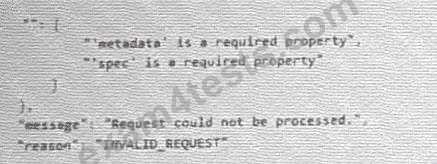
* vCPUs: 2
* Memory: BGb
* Disk Size: 50Gb
* Cluster: Cluster A
* Network: default- net
The API call is falling, indicating an issue with the payload:
The body is saved in Desktop/ Files/API_Create_VM,text
Correct any issues in the text file that would prevent from creating the VM. Also ensure the VM will be created as speeded and make sure it is saved for re-use using that filename.
Deploy the vm through the API
Note: Do not power on the VM.
Correct Answer:
See the Explanation for step by step solution.
Explanation:
https://portal.nutanix.com/page/documents/kbs/details?targetId=kA00e000000LLEzCAO
https://jsonformatter.curiousconcept.com/#
acli net.list (uuid network defult_net)
ncli cluster info (uuid cluster)
Put Call: https://Prism Central IP address : 9440/api/nutanix/v3vms
Edit these lines to fix the API call, do not add new lines or copy lines.
You can test using the Prism Element API explorer or PostMan
Body:
{
{
"spec": {
"name": "Test_Deploy",
"resources": {
"power_state":"OFF",
"num_vcpus_per_socket": ,
"num_sockets": 1,
"memory_size_mib": 8192,
"disk_list": [
{
"disk_size_mib": 51200,
"device_properties": {
"device_type":"DISK"
}
},
{
"device_properties": {
"device_type":"CDROM"
}
}
],
"nic_list":[
{
"nic_type": "NORMAL_NIC",
"is_connected": true,
"ip_endpoint_list": [
{
"ip_type": "DHCP"
}
],
"subnet_reference": {
"kind": "subnet",
"name": "default_net",
"uuid": "00000000-0000-0000-0000-000000000000"
}
}
],
},
"cluster_reference": {
"kind": "cluster",
"name": "NTNXDemo",
"uuid": "00000000-0000-0000-0000-000000000000"
}
},
"api_version": "3.1.0",
"metadata": {
"kind": "vm"
}
}
https://www.nutanix.dev/2019/08/26/post-a-package-building-your-first-nutanix-rest-api-post-request/ Reference
The DB team is requesting an SQL database instance and has requested it be configured for best performance.
This VM has been migrated from a 3 tier solution into Nutanix.
The database VM hosts 4 databases, each set to a 20 GB limit. Logs are expected to not grow beyond 20 GB and should be limited to within 25% to avoid runaway processes. Do not configure more storage than is needed.
The VM that has been migrated is identified as sql3532. Once the VM has been properly reconfigured, the DBA team will reconfigure the OS and database.
The VM should be configured as per KB-3532.
While this VM is being tested, make sure it is the first VM to power up in the event the node it is on goes down.
To maximize performance, ensure as much of the VM as possible will be kept on SSD drives.
Note: The VM does not need to be powered on. The VM should remain on the default container and should not be configured with a volume group. No network is required at this time.
Correct Answer:
See the Explanation below for detailed answer.
Explanation:
Here is the step-by-step solution to reconfigure the sql3532 virtual machine.
This task is performed from the Prism Element interface for the cluster the VM is on (e.g., Cluster 1).
1. Locate and Update the VM
* From the Prism Element main dashboard, navigate to the VM view.
* Find the VM named sql3532 in the VM table.
* Select the checkbox next to sql3532 and click the Update button.
2. Configure HA Priority and Flash Mode
In the "Update VM" dialog, configure the HA and SSD performance settings:
* HA Priority:
* Find the VM High Availability section.
* Select the High Priority radio button. This ensures it is one of the first VMs to power on during an HA event.
* Flash Mode (SSD Performance):
* Scroll down to the Flash Mode section.
* Check the box to Enable Flash Mode. This pins the VM's vDisks to the SSD tier, satisfying the requirement to keep as much of the VM as possible on SSDs, especially since it's on the default (hybrid) container.
3. Reconfigure Disks (per KB-3532)
While still in the "Update VM" dialog, scroll to the Disks section to add the new data and log disks. The key to "best performance" (KB-3532) is to place Data and Logs on separate vSCSI controllers.
* (The VM already has an OS disk, which we will assume is on scsi.0.)
* Add Data Disk:
* Click the + Add New Disk button.
* Storage Container: default (as required).
* Size: 80 GB (for the 4 x 20 GB databases).
* Bus Type: SCSI.
* Device Index: 1. (This creates a new vSCSI controller, scsi.1, for the data disk).
* Click Add.
* Add Log Disk:
* Click the + Add New Disk button.
* Storage Container: default (as required).
* Size: 20 GB.
* Bus Type: SCSI.
* Device Index: 2. (This creates a third vSCSI controller, scsi.2, for the log disk).
* Click Add.
4. Save Configuration
* After adding the disks and setting HA/Flash Mode, click the main Save button at the bottom of the
"Update VM" dialog.
The VM is now configured with high availability, its storage is pinned to SSD, and its disk layout follows performance best practices by separating the OS, Data, and Log I/O paths onto three different controllers.
Viewing page 1 out of 9 pages.
Viewing questions 1-4 out of 33 questions.
Over 86378+ Satisfied Customers
Thanks for the helpful NCM-MCI-6.10 questions and answers.
 Sandra

Without the help of these products, it might be difficult for me to pass the NCM-MCI-6.10 Certification exam so easily.
 Cornelia

The updated version is valid. Passd NCM-MCI-6.10
 Leo
After passing the NCM-MCI-6.10
certification exam, I have got my desired job.
 Oswald
Hi Guys, I have passed with a score as 96%. There are some questions i couldn't remember, but i still passed as i remember most of them. Good luck!
 Barry
Pass with 92% score, this dump is still valid. About 3-4 questions are different, but the remaining is ok for pass. I passed successfully.
 Belle
Studied NCM-MCI-6.10 a week and passed. NCM-MCI-6.10 is my only materials for my exam.
 Kerr
I passed NCM-MCI-6.10 exam yesterday,the materials' coverage is so perfect,will come back to you
 Joy
Luckily, I passed NCM-MCI-6.10 exam in the first attempt.
 Judy

Testing engine is the best guide to the certified NCM-MCI-6.10 exam. Helped me score 95% in the exam. Thank you Exam4Tests.
 Monroe
Happy! I checked my email minutes ago, and there it was.. Congratulations email from Nutanix!
 Fanny
I bought NCM-MCI-6.10 exam dumps a week ago, the online test engine is very perfect to me.I think this dumps is very helpful to my test preparation...
 Vivien
Exam4Tests Practice Exams are written to the highest standards of technical accuracy, using only certified subject matter experts and published authors for development - no all study materials.
We are committed to the process of vendor and third party approvals. We believe professionals and executives alike deserve the confidence of quality coverage these authorizations provide.
If you prepare for the exams using our Exam4Tests testing engine, It is easy to succeed for all certifications in the first attempt. You don't have to deal with all dumps or any free torrent / rapidshare all stuff.
Exam4Tests offers free demo of each product. You can check out the interface, question quality and usability of our practice exams before you decide to buy.


 PDF Version Demo


