

UPDATED [Apr 08, 2026] Pass Endpoint Administrator Exam with Latest Questions
MD-102 Exam Practice Questions prepared by Microsoft Professionals
NEW QUESTION # 111
You have a Microsoft 365 E5 subscription that contains a group named Group1.
You create a Conditional Access policy named CAPolicy1 and assign CAPolicy1 to Group1.
You need to configure CAPolicy1 to require the members of Group1 to reauthenticate every eight hours when they connect to Microsoft Exchange Online.
What should you configure?
- A. Session access controls
- B. an assignment that uses a Sign-in risk condition
- C. an assignment that uses a User risk condition
- D. Grant access controls
Answer: A
Explanation:
User sign-in frequency
Sign-in frequency defines the time period before a user is asked to sign in again when attempting to access a resource.
The Azure Active Directory (Azure AD) default configuration for user sign-in frequency is a rolling window of 90 days.
Sign-in frequency control
* Sign in to the Azure portal as a global administrator, security administrator, or Conditional Access administrator.
* Browse to Azure Active Directory > Security > Conditional Access.
* Select New policy.
* Give your policy a name. We recommend that organizations create a meaningful standard for the names of their policies.
* Choose all required conditions for customer's environment, including the target cloud apps.
* Under Access controls > Session.
Select Sign-in frequency.
Choose Periodic reauthentication and enter a value of hours or days or select Every time.
* Save your policy.
Reference:https://docs.microsoft.com/en-us/azure/active-directory/conditional-access/howto-conditional-access-s
NEW QUESTION # 112
Your network contains an on-premises Active Directory Domain Services (AD DS) domain that syncs with an Azure AD tenant. The tenant contains the users shown in the following table.
You assign Windows 10/11 Enterprise E5 licenses to Gtoup1 and Uset2.
You deploy the devices shown in the following table.
For each of the following statements, select Yes if the statement is true. Otherwise, select No.
NOTE: Each correct selection is worth one point.
Answer:
Explanation:
Explanation
NEW QUESTION # 113
You have a shared computer that runs Windows 10.
The computer is infected with a virus.
You discover that a malicious TTF font was used to compromise the computer.
You need to prevent this type of threat from affecting the computer in the future.
What should you use?
- A. Windows Defender SmartScreen
- B. Windows Defender Application Guard
- C. Windows Defender System Guard
- D. Windows Defender Credential Guard
- E. Windows Defender Exploit Guard
Answer: E
Explanation:
Exploit protection helps protect against malware that uses exploits to infect devices and spread.
Exploit protection consists of many mitigations that can be applied to either the operating system or individual apps.
Reference:
https://docs.microsoft.com/en-us/windows/security/threat-protection/microsoft-defender- atp/exploit-protection
NEW QUESTION # 114
You have a Microsoft Deployment Toolkit (MDT) deployment share.
From the Deployment Workbench, you open the New Task Sequence Wizard and select the Standard Client Upgrade Task Sequence task sequence template.
You discover that there are no operating system images listed on the Select OS page as shown in the following exhibit.
You need to be able to select an operating system image to perform a Windows 11 in-place upgrade.
What should you do?
- A. Import a custom image file.
- B. Enable monitoring for the deployment share.
- C. Import a full set of source files.
- D. Run the Update Deployment Share Wizard
Answer: A
NEW QUESTION # 115
You need to assign the same deployment profile to all the computers that are configured by using Windows Autopilot.
Which two actions should you perform? Each correct answer presents part of the solution.
NOTE: Each correct selection is worth one point.
- A. Join the computers to Azure AD.
- B. Assign a Windows Autopilot deployment profile to a group.
- C. Create an Azure AD group that has dynamic membership rules and uses the operatingSystem tag.
- D. Create an Azure AD group that has dynamic membership rules and uses the ZTDID tag.
- E. Create a Group Policy object (GPO) that is linked to a domain.
- F. Join the computers to an on-premises Active Directory domain.
Answer: B,D
Explanation:
Ref:
https://learn.microsoft.com/en-us/autopilot/enrollment-autopilot#:~:text=To%20create%20a%20group%20that%
NEW QUESTION # 116
You have a Microsoft 365 subscription that includes Microsoft Intune.
You have computers that run Windows 11 as shown in the following table.
You have the groups shown in the following table.
You create and assign the compliance policies shown in the following table.
The next day, you review the compliance status of the computers.
For each of the following statements, select Yes if the statement is true. Otherwise, select No.
NOTE: Each correct selection is worth one point.
Answer:
Explanation:
Explanation:
NEW QUESTION # 117
You have a Microsoft 365 subscription that uses Microsoft Intune Suite.
You use Microsoft Intune to manage devices.
You use Windows Autopilot to deploy Windows 11 to devices.
A support engineer reports that when a deployment fails, they cannot collect deployment logs from failed device.
You need to ensure that when a deployment fails, the deployment logs can be collected.
What should you configure?
- A. the Windows Autopilot deployment profile
- B. the device configuration profile
- C. the automatic enrollment settings
- D. the enrollment status page (ESP) profile
Answer: A
NEW QUESTION # 118
You have a Microsoft Deployment Toolkit (MDT) deployment share named DS1.
You import a Windows 11 image to DS1.
You have an executable installer for an application named App1.
You need to ensure that App1 will be installed for all the task sequences that deploy the image.
Which three actions should you perform in sequence? To answer, move the appropriate actions from the list of actions to the answer area and arrange them in the correct order.
Answer:
Explanation:
1 - Add App1 to DS1.
2 - Identify the GUID of App1.
3 - Modify CustomSettings.ini.
NEW QUESTION # 119
You need a new conditional access policy that has an assignment for Office 365 Exchange Online.
You need to configure the policy to meet the technical requirements for Group4.
Which two settings should you configure in the policy? To answer, select the appropriate settings in the answer area.
NOTE: Each correct selection is worth one point.
Answer:
Explanation:
Explanation
The policy needs to be applied to Group4 so we need to configure Users and Groups.
The Access controls are set to Block access
A screenshot of a computer Description automatically generated
We therefore need to exclude compliant devices.
From the scenario:
Ensure that the users in a group named Group4 can only access Microsoft Exchange Online from devices that are enrolled in Intune.
Note: When a device enrolls in Intune, the device information is updated in Azure AD to include the device compliance status. This compliance status is used by conditional access policies to block or allow access to e-mail and other organization resources.
References:
https://docs.microsoft.com/en-us/azure/active-directory/conditional-access/overview
https://docs.microsoft.com/en-us/azure/active-directory/conditional-access/conditions
https://docs.microsoft.com/en-us/intune/device-compliance-get-started
NEW QUESTION # 120
You have a Microsoft 365 subscription that uses Microsoft Intune.
You plan to use Windows Autopilot to provision 25 Windows 11 devices.
You need to meet the following requirements during device provisioning:
* Display the progress of app and profile deployments.
* Join the devices to Azure AD.
What should you configure to meet each requirement? To answer drag the appropriate settings to the correct requirements. Each setting may be used once, more than once, or not at all. You may need to drag the split bar between panes or scroll to view content.
NOTE: Each correct selection is worth one point.
Answer:
Explanation:
Explanation:
NEW QUESTION # 121
You have a Microsoft 365 E5 subscription that contains devices enrolled in Microsoft Intune as shown in the following table.
The Remote Help Tier1 role is configured as shown in the following exhibit.
For each of the following statements, select Yes if the statement is true. Otherwise, select No.
NOTE: Each correct selection is worth one point.
Answer:
Explanation:
Explanation: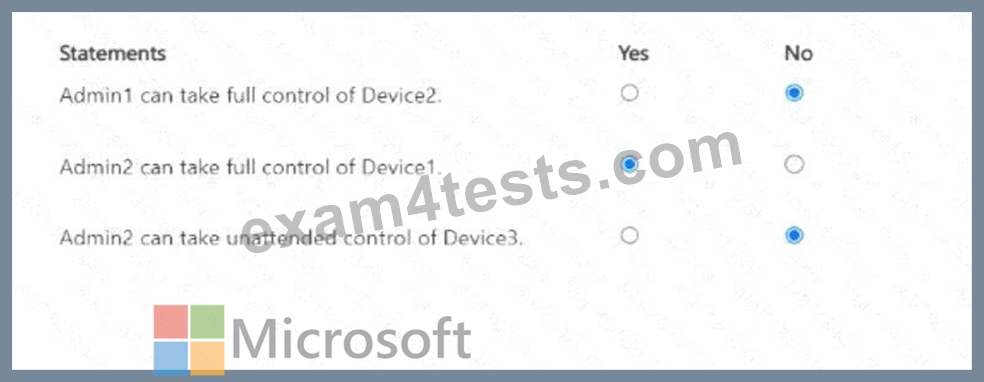
NEW QUESTION # 122
You have a Microsoft Deployment Toolkit (MDT) deployment share.
From the Deployment Workbench, you open the New Task Sequence Wizard and select the Standard Client Upgrade Task Sequence task sequence template.
You discover that there are no operating system images listed on the Select OS page as shown in the following exhibit.
You need to be able to select an operating system image to perform a Windows 11 in-place upgrade.
What should you do?
- A. Import a custom image file.
- B. Enable monitoring for the deployment share.
- C. Import a full set of source files.
- D. Run the Update Deployment Share Wizard
Answer: A
NEW QUESTION # 123
You manage 1.000 devices by using Microsoft Intune. You review the Device compliance trends report. For how long will the report display trend data?
- A. 365 days
- B. 30 days
- C. 60 days
- D. 90 days
Answer: C
Explanation:
The Device compliance trends report shows the number of devices that are compliant, noncompliant, and not evaluated over time. The report displays trend data for the last 60 days by default, but you can change the time range to view data for the last 7, 14, or 30 days as well. The report does not show data for more than 60 days. References: [Device compliance trends report]
NEW QUESTION # 124
You have an Azure AD tenant named contoso.com. You have the devices shown in the following table.
Which devices can be Azure AD joined, and which devices can be registered in contoso.com? To answer, select the appropriate options in the answer area. NOTE: Each correct selection is worth one point.
Answer:
Explanation:
Explanation:
NEW QUESTION # 125
You have a Microsoft Intune deployment that contains the resources shown in the following table.
You create a policy set named Set1 and add Comply1 to Set1.
Which additional resources can you add to Set1?
- A. CA1. Conf1. and Office 1 only
- B. Comply2 only
- C. Conf1 only
- D. Comply2 and Conf1 only
- E. Comply2. CA1, Conf1. and Office1
Answer: B
NEW QUESTION # 126
Hotspot Question
Your network contains an on-premises Active Directory Domain Services (AD DS) domain that syncs with an Azure AD tenant.
You have a Microsoft 365 subscription.
You plan to use Windows Autopilot to deploy new Windows devices.
You plan to create a deployment profile.
You need to ensure that the deployment meets the following requirements:
- Devices must be joined to AD DS regardless of their current working
location.
- Users in the marketing department must have a line-of-business (LOB)
app installed during the deployment.
The solution must minimize administrative effort.
What should you do for each requirement? To answer, select the appropriate options in the answer area.
NOTE: Each correct selection is worth one point.
Answer:
Explanation:
NEW QUESTION # 127
You have a Microsoft 365 E5 subscription that includes Microsoft Intune.
For macOS devices, you create an update policy named Policy1 that has the following settings:
- All other updates (OS, built-in apps): Download and install
- Assignments:
- Included groups: All Devices
Which two types of updates can be downloaded and installed by using Policy1? Each correct answer presents part of the solution.
NOTE: Each correct selection is worth one point.
- A. configuration file
- B. firmware
- C. macOS
- D. built-in app
- E. critical
Answer: C,D
Explanation:
https://learn.microsoft.com/en-us/mem/intune/protect/software-updates-macos
NEW QUESTION # 128
......
MD-102 Exam Practice Materials Collection: https://www.exam4tests.com/MD-102-valid-braindumps.html
Use Valid New MD-102 Questions - Top choice Help You Gain Success: https://drive.google.com/open?id=1kXx2cA-g32p3jg630jt92XFNfSd12yMJ